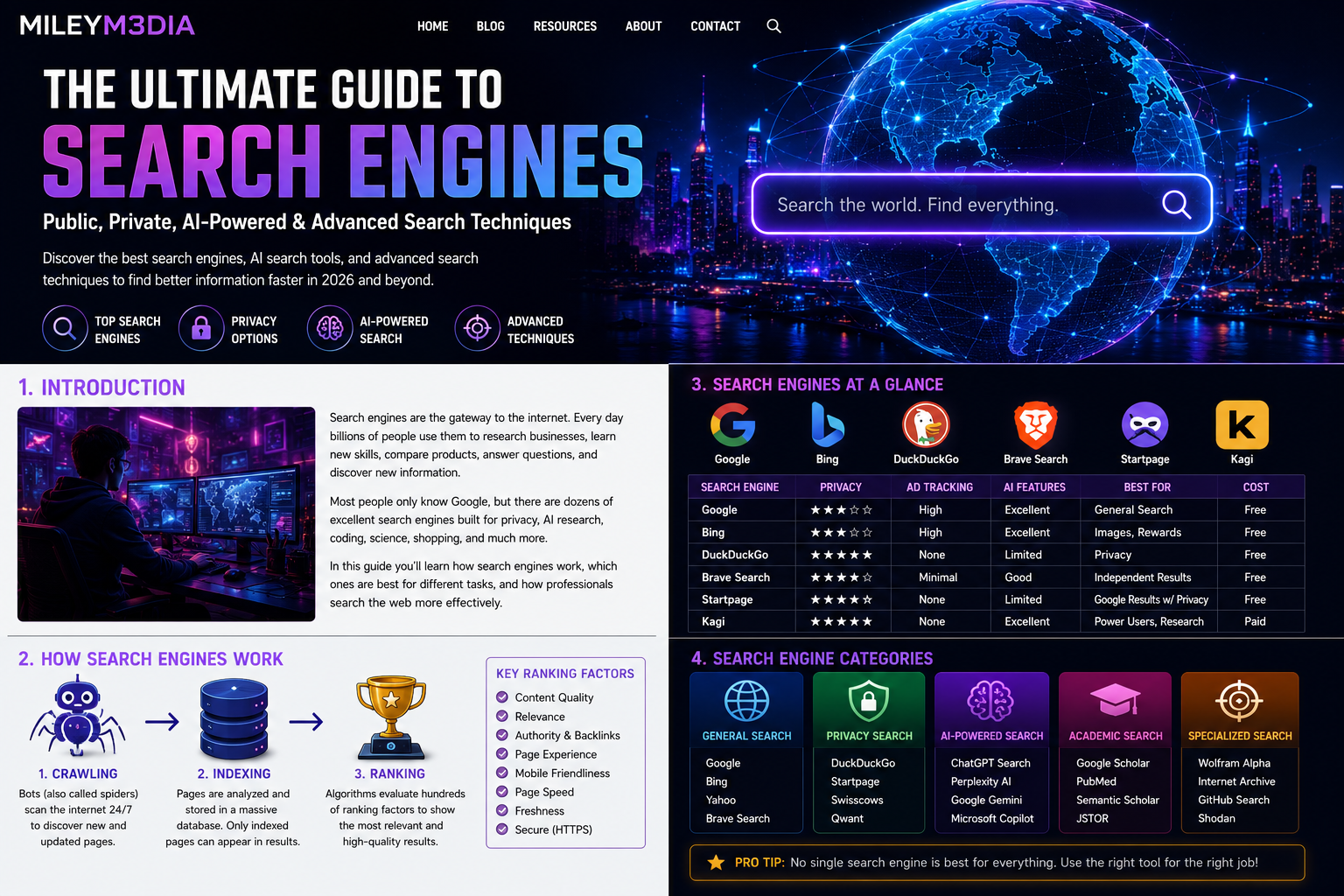

Public, Private, AI-Powered & Advanced Search Techniques
Reading Time: 45–60 Minutes
Last Updated: July 2026
Meta Description
Learn how modern search engines work, compare Google, Bing, DuckDuckGo, Brave Search, Startpage, Kagi, and discover AI search, privacy-focused browsing, reverse image search, and advanced search operators in this comprehensive guide.
The Ultimate Guide to Search Engines
Introduction
Every second, millions of searches are performed across the internet. Whether you’re looking for breaking news, researching a health topic, learning to code, comparing products, or finding a local business, search engines have become one of the most important technologies in modern life.
Most people think of Google when they hear the phrase “search engine,” but Google is only one piece of a much larger ecosystem. There are privacy-first search engines that minimize tracking, AI-powered tools that summarize information, academic databases containing peer-reviewed research, image search platforms, developer-focused search tools, and specialized search engines that help professionals analyze publicly available internet infrastructure, scientific data, historical websites, and much more.
Learning how these tools work—and choosing the right one for the task—can dramatically improve the speed, accuracy, and quality of your research.
This guide is designed for students, business owners, marketers, journalists, developers, creators, and anyone who wants to become more effective at finding trustworthy information online.
A Brief History of Search Engines
Before search engines existed, finding information online was difficult. Early internet users relied on manually organized directories where websites were listed by category. As the web expanded, this approach quickly became impossible to maintain.
Several pioneering search tools helped shape the internet:
- Archie (1990): One of the earliest searchable indexes of internet files.
- Veronica and Jughead: Search tools for the Gopher protocol.
- Lycos: An early web crawler that indexed millions of pages.
- AltaVista: Known for its speed and powerful search capabilities in the 1990s.
- Ask Jeeves: Popularized natural-language questions.
- Yahoo! Directory: A human-curated catalog of websites before transitioning into a search portal.
The biggest shift came in 1998 when Google introduced PageRank, an algorithm that evaluated the authority of a page by analyzing links from other websites. Rather than simply matching keywords, Google attempted to estimate which pages were most useful. Over time, search engines evolved to include machine learning, semantic search, natural language processing, and AI-assisted ranking systems.
How Search Engines Work
Although each search engine has its own technology, most follow three core steps: crawling, indexing, and ranking.
1. Crawling
Search engines use automated programs—often called crawlers, spiders, or bots—to discover web pages. These programs follow links across the internet, finding new pages and revisiting existing ones to detect updates.
2. Indexing
After a page is discovered, the search engine analyzes its content and stores information in a massive searchable database called an index.
Information that may be indexed includes:
- Page titles
- Headings
- Main content
- Images
- Videos
- Metadata
- Structured data
- Internal and external links
- Language
- Publication date
- Mobile compatibility
If a page isn’t indexed, it generally won’t appear in search results.
3. Ranking
When you type a search query, the engine scans its index and ranks potential results using hundreds of signals.
Common ranking factors include:
- Relevance to the search
- Content quality
- Expertise and authority
- User experience
- Mobile friendliness
- Page speed
- HTTPS security
- Freshness
- Helpful content
- Backlinks from reputable websites
Modern search engines also try to understand search intent. For example, if you search for “jaguar,” the engine may determine whether you mean the animal, the automobile brand, or a sports team based on context.
Types of Search Engines
Not all search engines are designed for the same purpose. Choosing the right one can save time and improve the quality of your results.
General Search Engines
These index a broad range of public websites and are suitable for everyday use.
Examples include Google, Bing, Yahoo, Brave Search, DuckDuckGo, and Startpage.
Privacy-Focused Search Engines
These aim to reduce tracking and personalization while still providing useful search results.
Examples include DuckDuckGo, Brave Search, and Startpage.
AI-Powered Search
AI search tools can summarize information, compare sources, explain complex topics, and help answer questions conversationally.
Examples include ChatGPT, Perplexity, Google Gemini, Claude, and Microsoft Copilot.
Academic Search Engines
These specialize in scholarly journals, research papers, books, conference proceedings, and scientific literature.
Examples include Google Scholar, PubMed, Semantic Scholar, and JSTOR.
Specialized Search Tools
Some search platforms focus on specific kinds of information such as patents, historical websites, open-source software, scientific calculations, or internet-connected devices for defensive security and asset inventory.
Google Search
Google remains the world’s most widely used search engine thanks to its enormous index and sophisticated ranking algorithms.
Best Uses
- Everyday searches
- Local businesses
- Maps
- Shopping
- Images
- Videos
- News
- Technical documentation
Strengths
- Extensive web index
- Fast search performance
- High-quality ranking
- Excellent spam detection
- Rich search features
- Strong mobile experience
Limitations
- Personalized results may differ between users.
- Advertising and SEO competition can make it harder for smaller websites to appear.
Microsoft Bing
Microsoft Bing has evolved into a capable search platform with AI-assisted features, strong image search, and close integration with Microsoft products.
Best Uses
- Image search
- Shopping comparisons
- PDF documents
- News
- Microsoft ecosystem users
Advantages
- Excellent image search
- AI-powered assistance
- Video previews
- Rewards program
Yahoo Search
Yahoo combines web search with news, finance, sports, entertainment, and email. While many of its search results are powered by Bing, its portal experience remains popular with some users.
DuckDuckGo
DuckDuckGo focuses on privacy. It minimizes tracking and avoids creating detailed advertising profiles based on your searches.
Best For
- Privacy-conscious users
- General web searches
- Less personalized results
Brave Search
Brave Search maintains much of its own independent search index, offering an alternative to search engines that rely heavily on larger providers.
Highlights
- Independent indexing
- Privacy-first approach
- AI-assisted summaries
- Minimal tracking
Startpage
Startpage is designed to provide search results similar to Google’s while helping reduce the amount of identifying information shared during searches.
Kagi
Kagi is a subscription-based search engine that prioritizes search quality over advertising. It offers customizable ranking controls, no ads, and features aimed at researchers and professionals.
Comparison Table
| Search Engine | Privacy | AI Features | Ads | Best For |
| Moderate | Excellent | Yes | General web search | |
| Bing | Moderate | Excellent | Yes | Images, shopping |
| Yahoo | Moderate | Limited | Yes | News & portal |
| DuckDuckGo | High | Limited | Minimal | Privacy |
| Brave Search | High | Good | Minimal | Independent search |
| Startpage | High | Limited | Minimal | Google-style results with privacy |
| Kagi | High | Excellent | No | Professional research |
Tips for Better Searching
Simple changes to your search habits can produce dramatically better results.
- Use specific keywords instead of broad phrases.
- Put exact phrases in quotation marks when appropriate.
- Compare results across multiple search engines.
- Check publication dates for time-sensitive topics.
- Look for primary sources whenever possible.
- Use official websites when researching companies, products, or government information.
Coming Up in Part 2
In the next section, we’ll explore:
- AI-powered search assistants
- Academic and scientific search databases
- Reverse image search
- Video search
- Code and documentation search
- Historical archives
- Productivity-focused search workflows
- Safe advanced search operators for more precise research
Part 2 – AI Search, Academic Research, Image Search & Specialized Search Engines
Artificial Intelligence Is Changing Search Forever
For over two decades, search engines worked in much the same way: you entered keywords, and the search engine returned a ranked list of links. While this approach remains incredibly useful, artificial intelligence has transformed how people discover and interact with information.
Instead of only presenting links, AI-powered search tools can summarize articles, explain complex concepts, compare products, generate code, organize research, and answer follow-up questions in a conversational format. These capabilities make AI an increasingly valuable companion to traditional search engines—especially for brainstorming, learning, and synthesizing information from multiple sources.
It’s important to remember, however, that AI-generated answers can occasionally contain mistakes or outdated information. For important topics such as health, finance, law, or safety, it’s wise to verify key facts with reliable primary sources.
ChatGPT
ChatGPT is designed to help users understand information, brainstorm ideas, write content, summarize documents, explain technical concepts, and answer questions in natural language.
Best Uses
- Learning new topics
- Writing and editing
- Coding assistance
- Brainstorming ideas
- Summarizing long documents
- Explaining difficult concepts
- Creating outlines and checklists
Strengths
- Conversational interaction
- Strong explanations
- Context-aware follow-up questions
- Excellent writing assistance
- Helpful for planning and organization
Things to Keep in Mind
- Verify important facts using authoritative sources.
- For time-sensitive information, use current web sources when available.
Google Gemini
Google Gemini combines AI assistance with Google’s search ecosystem.
Best For
- Research
- Google Workspace users
- Productivity
- Summaries
- Content creation
Gemini integrates with Google’s services and can assist with brainstorming, drafting, and information discovery.
Microsoft Copilot
Microsoft Copilot combines AI with Bing search and Microsoft 365 applications.
Great For
- Office productivity
- Research
- Writing
- Coding
- Summarizing webpages
Users who work heavily within the Microsoft ecosystem may find Copilot especially useful.
Perplexity
Perplexity focuses on providing AI-generated answers with citations to supporting sources, making it a popular tool for research-oriented workflows.
Advantages
- Source citations
- Follow-up questions
- Fast summaries
- Research-friendly interface
Claude
Claude is known for its ability to work with long documents and provide thoughtful summaries, editing assistance, and structured writing.
Popular Uses
- Editing
- Long-form writing
- Document analysis
- Brainstorming
- Research organization
When Should You Use AI Instead of Search?
Traditional search engines remain the best choice when you want:
- Official websites
- Local businesses
- Shopping
- Maps
- Breaking news
- Specific documents
AI assistants shine when you need:
- Explanations
- Summaries
- Comparisons
- Brainstorming
- Writing help
- Step-by-step learning
Many professionals use both together: a search engine to locate reliable sources and AI to help organize and explain the information.
Academic Search Engines
General search engines often prioritize popular webpages, while academic search engines focus on scholarly and peer-reviewed research.
Google Scholar
Google Scholar indexes academic papers, conference proceedings, books, patents, and scholarly publications.
Best For
- Scientific research
- University papers
- Citations
- Literature reviews
PubMed
PubMed specializes in biomedical and life sciences literature.
Healthcare professionals, researchers, and students frequently use it to locate peer-reviewed medical research.
Semantic Scholar
Semantic Scholar uses artificial intelligence to help researchers discover relevant scientific papers more efficiently.
It highlights influential publications, citation relationships, and related research.
JSTOR
JSTOR contains journals, books, historical archives, and educational materials covering subjects including history, literature, economics, and the humanities.
Reverse Image Search
Sometimes an image tells you more than words.
Reverse image search allows you to upload an image—or paste its URL—to discover visually similar images or pages where that image appears.
Common Uses
- Identifying products
- Finding higher-resolution images
- Discovering the original source
- Fact-checking viral images
- Identifying landmarks
- Researching artwork
Google Lens
Google Lens combines image recognition with search technology.
Point your phone at an object, plant, landmark, or product, and Lens attempts to identify it and provide additional information.
Popular uses include:
- Translating text
- Shopping
- Plant identification
- Landmark recognition
- Homework assistance
TinEye
TinEye specializes in finding where an image has appeared online.
It is particularly useful for:
- Tracking reused images
- Identifying altered versions
- Finding original publications
Video Search
Videos often explain concepts more effectively than text.
Popular platforms include:
- YouTube
- Vimeo
- Dailymotion
Use videos to:
- Learn software
- Watch tutorials
- Follow lectures
- Compare products
- Observe demonstrations
Code Search
Developers rely on specialized search tools every day.
Popular resources include:
- GitHub
- Stack Overflow
- MDN Web Docs
These platforms help programmers find documentation, examples, bug fixes, and open-source projects.
Specialized Search Engines
Some search engines focus on highly specific types of information rather than the general web.
Wolfram Alpha
Instead of returning webpages, Wolfram Alpha computes answers to many mathematical, engineering, and scientific questions.
Popular uses include:
- Mathematics
- Unit conversions
- Engineering calculations
- Statistics
- Data visualization
Internet Archive
The Internet Archive preserves digital history.
Its Wayback Machine allows users to view historical snapshots of websites over time, making it valuable for research, journalism, and web preservation.
Open Library
Open Library helps users locate millions of digitized books and publication records.
GitHub Search
GitHub Search helps developers discover:
- Open-source software
- Programming examples
- Documentation
- APIs
- Developer tools
Public Internet Infrastructure Search
There are specialized platforms that help organizations inventory publicly accessible internet infrastructure, certificates, and network assets. These tools are widely used by defenders, researchers, and IT teams for asset management and security auditing of systems they own or are authorized to assess.
When using any such platform, always ensure your activities are lawful and authorized.
Choosing the Right Search Tool
| Task | Recommended Tool |
| General Questions | |
| Writing Help | ChatGPT |
| Research with Sources | Perplexity |
| Medical Studies | PubMed |
| Academic Papers | Google Scholar |
| Scientific Literature | Semantic Scholar |
| Books | Open Library |
| Historical Websites | Internet Archive |
| Programming | GitHub |
| Images | Google Images |
| Reverse Image Search | Google Lens / TinEye |
| Math | Wolfram Alpha |
Research Workflow Used by Professionals
Many researchers follow a structured process:
- Define the question clearly.
- Search using a general search engine.
- Compare results across multiple engines.
- Look for primary or official sources.
- Use academic databases for deeper research.
- Organize notes and citations.
- Verify important claims with multiple reliable references.
- Keep track of publication dates and updates.
This workflow helps improve both the quality and credibility of your research.
Coming Up in Part 3
In the final section, we’ll cover:
- Advanced search operators
- Safe, ethical search techniques for narrowing results
- Productivity tips
- Browser extensions
- Frequently asked questions
- Glossary of search terms
- Final recommendations and conclusion
The Ultimate Guide to Search Engines (2026)
Part 3 – Advanced Search Techniques, Productivity Tips, Browser Extensions, FAQ & Conclusion
Advanced Search Operators
Most people type a few words into a search engine and hope for the best. Power users, researchers, marketers, and journalists often use search operators to narrow results and find information more efficiently.
These operators work in many search engines (though support varies).
Exact Phrase Search
Use quotation marks to search for an exact phrase.
Example:
“best wireless headphones”
This tells the search engine to look for that exact phrase instead of individual words.
Great For
- Song lyrics
- Quotes
- Product names
- Error messages
- Company names
Excluding Words
Use the minus symbol (-) to exclude a word.
Example:
jaguar -car
This helps remove results about Jaguar automobiles if you’re looking for the animal.
Search Within One Website
Use the site: operator to search a specific website.
Examples:
site:wikipedia.org artificial intelligence
site:github.com python image processing
This is especially useful when a site’s own search isn’t very effective.
Search for File Types
Many search engines support narrowing results to specific file formats.
Example:
budget template filetype:pdf
Useful formats include:
- DOCX
- PPTX
- XLSX
This is handy for finding white papers, reports, presentations, manuals, and worksheets.
Wildcard Searches
An asterisk (*) can sometimes act as a placeholder for an unknown word in a phrase.
Example:
“The * fox jumps over the lazy dog”
Support varies by search engine.
Combine Operators
Operators can often be combined.
Example:
site:edu “machine learning” filetype:pdf
This narrows results to PDF documents on educational websites containing the exact phrase “machine learning.”
Safe, Ethical Research Techniques
Advanced search is most useful when applied responsibly.
Here are some effective, legitimate ways to improve your research:
- Compare results across multiple search engines.
- Look for official documentation.
- Use government and educational websites for authoritative information.
- Check publication dates.
- Read multiple perspectives.
- Verify claims with primary sources whenever possible.
- Keep notes on where information came from.
These habits improve both accuracy and credibility.
Search Smarter, Not Harder
Instead of searching:
camera
Try:
best mirrorless camera for travel under $1000
Instead of:
wordpress
Try:
WordPress Kadence theme performance optimization guide
The more specific your search, the more likely you are to receive relevant results.
Browser Extensions That Can Improve Research
Depending on your workflow, these types of browser extensions can be useful:
- Password managers
- Grammar checkers
- Citation generators
- Read-later tools
- Ad and tracker blockers
- Screenshot and annotation tools
- Web page highlighters
- Tab managers
Install extensions only from trusted sources and review the permissions they request.
Common Search Mistakes
Even experienced users can fall into habits that reduce search quality.
Avoid these common mistakes:
- Using only one search engine for every task.
- Ignoring publication dates.
- Trusting the first result without checking others.
- Using overly broad search terms.
- Confusing advertisements with organic results.
- Relying on a single source for important decisions.
- Forgetting to refine searches when results aren’t relevant.
Frequently Asked Questions
Which search engine is the most popular?
Google remains the most widely used search engine worldwide, followed by alternatives such as Bing and privacy-focused engines like DuckDuckGo and Brave Search.
Which search engine offers the most privacy?
DuckDuckGo, Brave Search, and Startpage are well-known for emphasizing user privacy and minimizing tracking.
Is AI replacing search engines?
Not entirely. AI tools are changing how people find and understand information, but traditional search engines remain essential for locating official websites, recent news, local businesses, maps, and many other resources. Many people now use both together.
What’s the difference between a search engine and an AI assistant?
A search engine primarily helps you discover existing webpages. An AI assistant can explain concepts, summarize information, organize ideas, and answer follow-up questions conversationally.
How can I tell if a source is trustworthy?
Look for:
- Author credentials
- Publication date
- Citations
- Official organizations
- Peer-reviewed research (when applicable)
- Multiple independent sources that agree
Glossary
Algorithm: A set of rules used to rank search results.
Crawler (Spider): An automated program that discovers web pages.
Index: A database of webpages that a search engine can retrieve.
Keyword: A word or phrase entered into a search engine.
Metadata: Information describing a webpage, such as its title or description.
Organic Results: Non-advertising search results.
Search Intent: The purpose behind a user’s query (informational, navigational, transactional, etc.).
SERP (Search Engine Results Page): The page displaying search results.
Final Recommendations
To become a more effective searcher:
- Choose the right search engine for the task.
- Use advanced search operators when appropriate.
- Compare information from multiple sources.
- Verify important facts.
- Explore AI tools to summarize and organize research.
- Continue refining your search skills—small improvements can save significant time over the long run.
Conclusion
Search engines are among the most powerful tools available on the internet, but getting the best results requires more than typing a few words into a search box. By understanding how search engines crawl, index, and rank information—and by knowing when to use privacy-focused engines, AI assistants, academic databases, and specialized research tools—you can dramatically improve the quality of your research.
Whether you’re a student, business owner, developer, content creator, or lifelong learner, becoming a better searcher will help you find more accurate information, work more efficiently, and make better-informed decisions.
Suggested Internal Links for Your Website
As your site grows, consider linking this guide to related articles such as:
- Beginner’s Guide to SEO
- How AI Is Changing Content Creation
- Best Free Research Tools
- WordPress SEO Checklist
- Cybersecurity Basics for Everyday Users
- Productivity Apps for Creators
Creating a network of related content helps readers explore your site and can improve navigation and search visibility over time.
Thanks for reading!
If you found this guide useful, consider bookmarking it and sharing it with colleagues, classmates, or anyone looking to improve their online research skills.
Part 4 – Resources, Official Links & Learning Hub
Official Search Engines
| Search Engine | Best For | Official Website |
| Google Search | General searching, maps, images, shopping | Official Google Search |
| Microsoft Bing | AI search, shopping, images | Official Bing |
| Yahoo Search | News, finance, general search | Official Yahoo Search |
| DuckDuckGo | Privacy-focused search | Official DuckDuckGo |
| Brave Search | Independent privacy search | Official Brave Search |
| Startpage | Google-style results with added privacy | Official Startpage |
| Kagi | Premium ad-free research | Official Kagi |
AI Search & Research
| Tool | Best For | Website |
| ChatGPT | Writing, coding, brainstorming | |
| Google Gemini | Google AI assistant | |
| Microsoft Copilot | Productivity & search | |
| Claude | Long-form writing & analysis | |
| Perplexity AI | AI search with citations |
Academic Search Engines
| Website | Purpose |
| Google Scholar | Scholarly articles |
| PubMed | Medical research |
| Semantic Scholar | Scientific literature |
| JSTOR | Journals & books |
| Open Library | Digital books |
| Internet Archive | Historical websites & media |
Developer Resources
| Resource | Purpose |
| GitHub | Open-source projects |
| Stack Overflow | Programming Q&A |
| MDN Web Docs | HTML, CSS & JavaScript |
| npm | JavaScript packages |
| PyPI | Python packages |
Image Search
| Website | Best For |
| Google Images | General image search |
| Google Lens | Visual search |
| TinEye | Reverse image search |
| Bing Images | Image search |
Video Search
Science & Math
Government Research
Browser Extensions Worth Exploring
- Password managers
- Ad & tracker blockers
- Grammar assistants
- Citation generators
- Read-later tools
- Screenshot utilities
- Bookmark managers
- Tab managers
Install browser extensions only from trusted sources and review their requested permissions.
Final Thoughts
The internet is much larger than a single search engine. By understanding the strengths of traditional search engines, AI assistants, academic databases, image search, developer resources, and privacy-focused tools, you can build a research workflow that is faster, more reliable, and better suited to your goals.
For many people, the best approach is to combine tools—for example, using a general search engine to discover sources, an academic database to verify research, and an AI assistant to help summarize or organize what you’ve found. This balanced approach can improve both efficiency and confidence in your results. (Microsoft Support)